AI-Era Visibility · Google AI Overviews · AI Mode · AEO · AI search
How to appear in Google AI Overviews: a plain guide for business owners
 Eimantas KazėnasFounder, RevflowsUpdated Published
To appear in Google AI Overviews, your page must first be indexed and allowed to show a snippet in Google Search. Then answer real, specific questions near the top of the page, cover the follow-up questions people ask, keep your Business Profile accurate, and make any schema match the visible text. Google says no special files or markup are needed.
Key takeaways
- First, the page must be indexed and allowed to show a snippet. No exceptions.
- AI Overviews show up most on questions and long searches. Write for those.
- Answer under a question heading, in the first one or two sentences.
- Cover the follow-up questions. Google runs several related searches for one answer.
- Track it for free in Search Console's generative AI report.
Google’s AI answer now sits above the links for many searches. If your page is a source, your name sits above your competitors.
To appear in Google AI Overviews, get the page indexed with a snippet, then answer a specific question clearly near the top and cover the follow-ups. Google says no special files or code are needed.
This guide applies the AEO basics to Google. AI Mode, Google’s chat-style search, follows the same rules.
Why it matters: fewer clicks, but cited brands win more of them
Fewer people click when an AI Overview appears. Pew Research Center found users clicked a normal result on 8% of visits with an AI summary, against 15% without one, per its analysis of real browsing data.
Being cited changes the picture. Seer Interactive tracked 53 brands and 5.47 million queries through 2025. On informational queries, brands cited in an AI Overview averaged a 2.07% organic click-through rate. When an AI Overview showed and the brand was not cited, it was 0.94%. That is more than double, per Seer’s 2026 study. Seer calls its data directional, so treat it as a pattern, not a promise.
And the audience is huge. AI Mode alone passed 1 billion monthly users, per Sundar Pichai’s Q2 2026 earnings remarks.
What does Google need before it can use your page?
One hard rule. Google’s guide says:
“To be eligible to be shown as a supporting link in AI Overviews or AI Mode, a page must be indexed and eligible to be shown in Google Search with a snippet, fulfilling the Search technical requirements.”
In plain terms:
- Indexed: Google has stored the page. Check it with the URL Inspection tool in Google Search Console.
- Snippet allowed: the page has no
nosnippetornoindextag. These are settings that tell Google not to show text from the page. - Reachable: robots.txt and your firewall let Googlebot in, and the page loads without errors.
If any of these fail, nothing else in this guide helps.
Which searches show an AI Overview?
Not every search gets one. Google says:
“AI Overviews are only shown when our systems determine that it is additive to classic Search, and as such, often don't trigger.”
Pew’s data shows where they appear most, from its March 2025 browsing study:
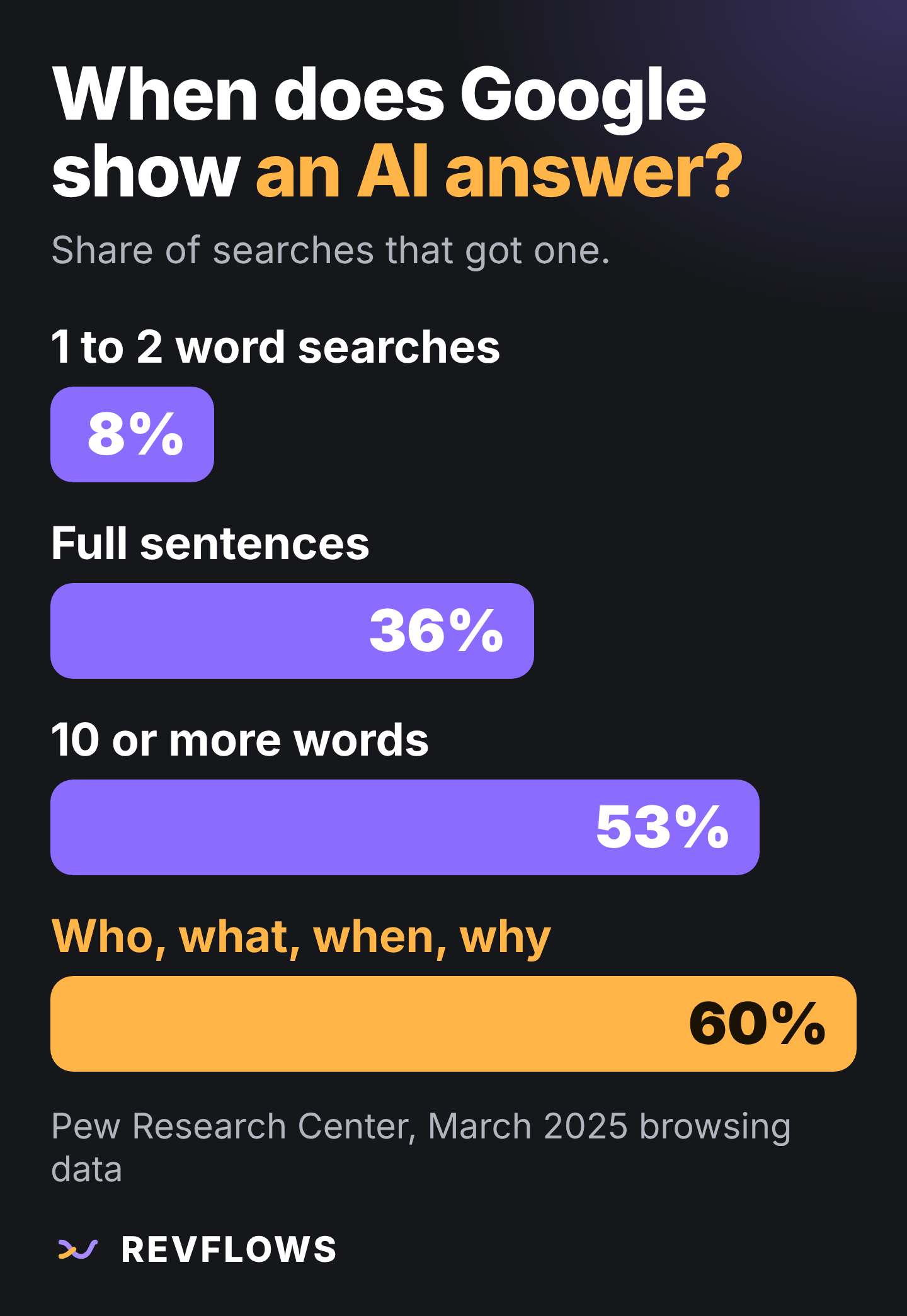
- 8% of one- or two-word searches
- 36% of searches written as full sentences
- 53% of searches with 10 or more words
- 60% of searches starting with who, what, when or why
What this means for you: don’t chase “dentist Bangkok”. Write for “How long does a dental implant take in Bangkok if I fly in from Perth?”
5 ways to get your page used in AI Overviews
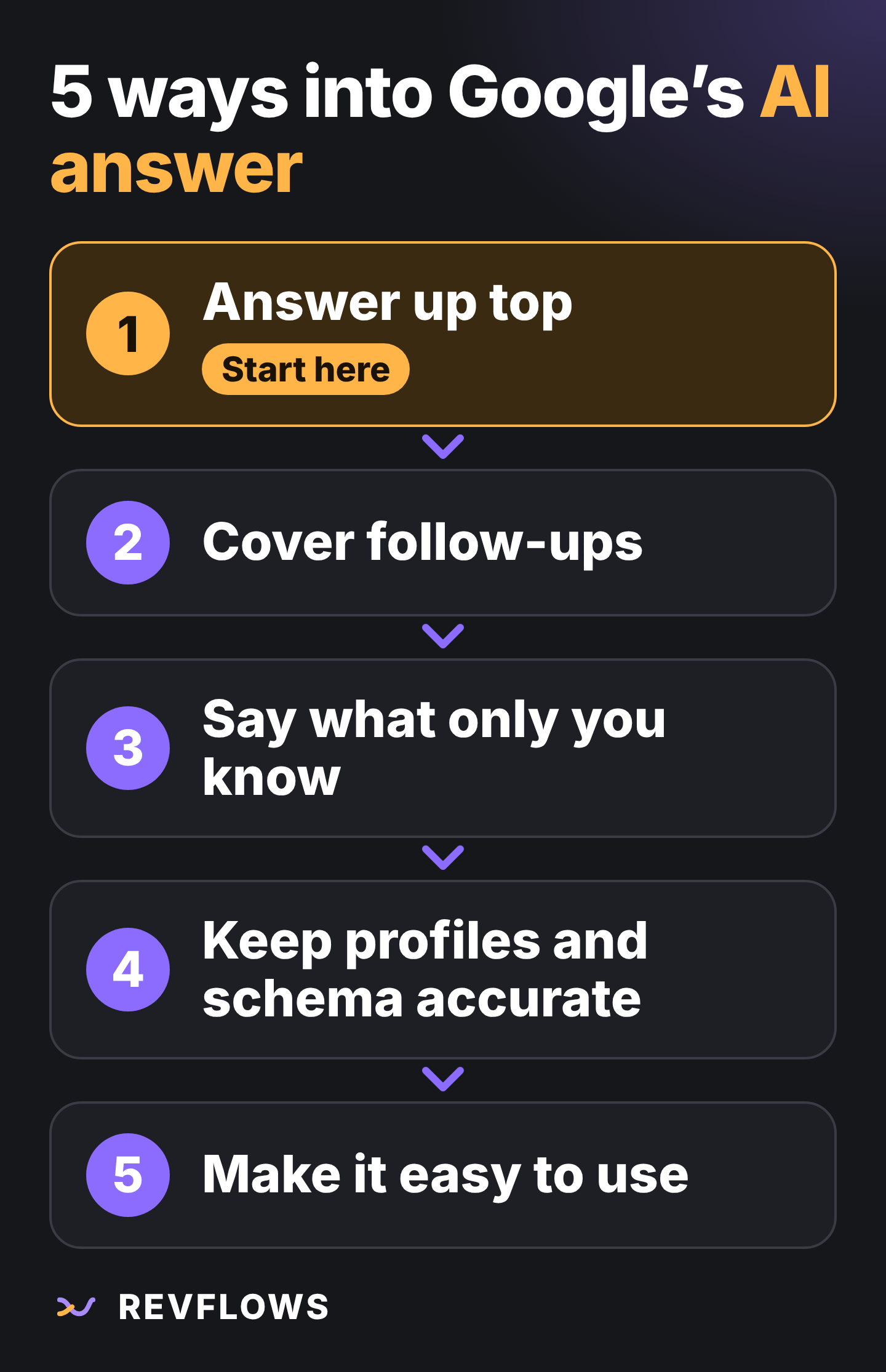
1. Answer the question up top
Use the customer’s question as a heading. Answer it in the next one or two sentences, with a fact: a price, a time, a place, a name. Then explain.
2. Cover the follow-up questions
Google builds one AI answer from several searches. It calls this “query fan-out”: running related searches across subtopics, per its AI features guide.
So one page should answer the obvious next questions too. For an implant page: cost, how many visits, recovery time, risks, and what happens if something goes wrong at home. Google’s “People also ask” box is a free list of follow-ups.
3. Add what only you know
If your page says what 50 other pages say, Google has no reason to pick yours. Google’s John Mueller wrote:
“Focus on making unique, non-commodity content that visitors from Search and your own readers will find helpful and satisfying.”
For a business, unique usually means your own facts: real prices, your process, your named experts, and answers to your own customers’ questions.
Add your own photos and video too. People now search with images as well as words, and Google advises supporting text with high-quality images and videos, in the same post. Give each image clear alt text (a short written description of it).
4. Keep your Business Profile and schema accurate
Google’s guide lists checking that “Merchant Center and Business Profile information is up-to-date” as a best practice for AI features. For a local business, the Business Profile is often the most-read source about you.
If you use schema (code that labels facts for machines), it must match the visible text. Google says there’s no special schema for AI Overviews:
“There's also no special schema.org structured data that you need to add.”
5. Make the page easy to use
Google lists page experience in its advice: pages that work on phones, load fast, and make the main content easy to find. A cluttered page loses the reader who clicks through, even if it got cited.
The full website checklist is in our AI search optimization guide.
How to track whether you appear
Search Console’s generative AI report. Rolled out to all websites on 31 August 2026. It shows impressions in AI Overviews and AI Mode by page, country, device and date. Start with the pages view: those are the pages Google already uses.
Clicks. Clicks from AI Overviews and AI Mode are counted in the normal “Web” performance report, per Google’s AI features guide. They are not split out.
Manual checks. Search your 10 to 20 key questions monthly from the country your customers are in. Note whether an AI Overview appears and whether you’re cited. Our guide to measuring AI search visibility has a simple scorecard.
What not to do
- Don’t block snippets to “protect” content.
nosnippetand similar settings also limit how your page can appear in AI features. - Don’t buy “AI Overviews schema” or AI text files. Google says none are needed.
- Don’t publish thin pages at scale. Google asks for unique, non-commodity content. Copies of what other sites say give it no reason to cite you.
AI Overviews vs AI Mode
AI Overviews are the AI summary on top of normal results. AI Mode is Google’s chat-style search, where people ask longer questions and follow-ups. Google is joining the two. Sundar Pichai said in the Q2 2026 earnings remarks that Google “brought together AI Overviews and AI Mode into one seamless Search experience”.
For you, the rules are the same. Google’s guide covers both features with one set of advice.
The questions differ. Google says queries in AI Mode are on average three times longer than traditional searches, per the Q3 2026 remarks. Longer questions reward pages with specific, detailed answers.
Want ChatGPT too? Read how to get your business recommended by ChatGPT.
Check where you stand
Free AI visibility check. Answer a few questions about your business and see where AI assistants are likely to skip you, and what to fix first.
Questions
How do I get my website into Google AI Overviews?
Make sure the page is indexed and allowed to show a snippet in Google Search, then answer a specific question clearly near the top of the page and cover the follow-up questions. Google says the normal SEO best practices apply and that no special optimization is required.
Do I need special schema or an llms.txt file for AI Overviews?
No. Google says you don't need new machine-readable files, AI text files or special schema to appear in AI Overviews or AI Mode. If you use structured data, it must match the visible content on the page.
Why does Google not show an AI Overview for my keyword?
Google only shows an AI Overview when it decides it adds value beyond normal results, so many searches don't get one. They appear far more often on questions and longer searches. Pew Research found 60% of searches starting with who, what, when or why produced an AI summary.
Can I see AI Overviews data in Google Search Console?
Yes. Since 31 August 2026 all sites have a generative AI performance report showing impressions in AI Overviews and AI Mode by page, country, device and date. Clicks from these features are counted in the normal Web search performance report.
Is being cited in AI Overviews worth it if people click less?
Usually, yes. Clicks fall when an AI Overview appears, but Seer Interactive found that on informational queries in 2025, brands cited in AI Overviews had more than double the organic click-through rate of brands that were not cited (2.07% against 0.94%).