AI Employees · Email marketing · Automation · How-to
Email marketing automation: the 5 flows every small business needs
 Eimantas KazėnasFounder, RevflowsUpdated Published
Email marketing automation means emails that send themselves when a customer does something, like joining your list, leaving a cart, buying or going quiet. You set each flow up once and it runs for years. Start with five: welcome, abandoned cart or booking, thank you and review, win-back, and a rebook or reorder reminder.
Key takeaways
- Automated emails send themselves when a customer acts: joins, abandons, buys or goes quiet.
- In Klaviyo's 2026 data, flows made nearly 41% of email revenue from 5.3% of sends.
- Start with five flows: welcome, abandoned cart or booking, thank you and review, win-back, rebook or reorder.
- Every flow needs a trigger, a wait, a check, the email and an exit rule.
- Judge each flow by revenue or bookings per recipient, not opens.
Most small businesses send email when they remember to. A newsletter here, a promotion there. Meanwhile, the moments that actually lead to a sale pass without a message: someone joins, leaves a cart, finishes a visit, goes quiet.
Email marketing automation means emails that send themselves at those moments. You set up each flow once. It sends the right email to each person, every time, for years.
It is one part of a wider email plan. For the full picture, including lists, campaigns and deliverability, start with our complete guide to email marketing for small business. This page goes deep on the automated part.
Why automated emails earn most
Klaviyo’s benchmarks, based on more than 183,000 of its customers, show how lopsided it is:
“Flows generate nearly 41% of total email revenue from just 5.3% of sends ... proving automation is the primary revenue engine in email.”
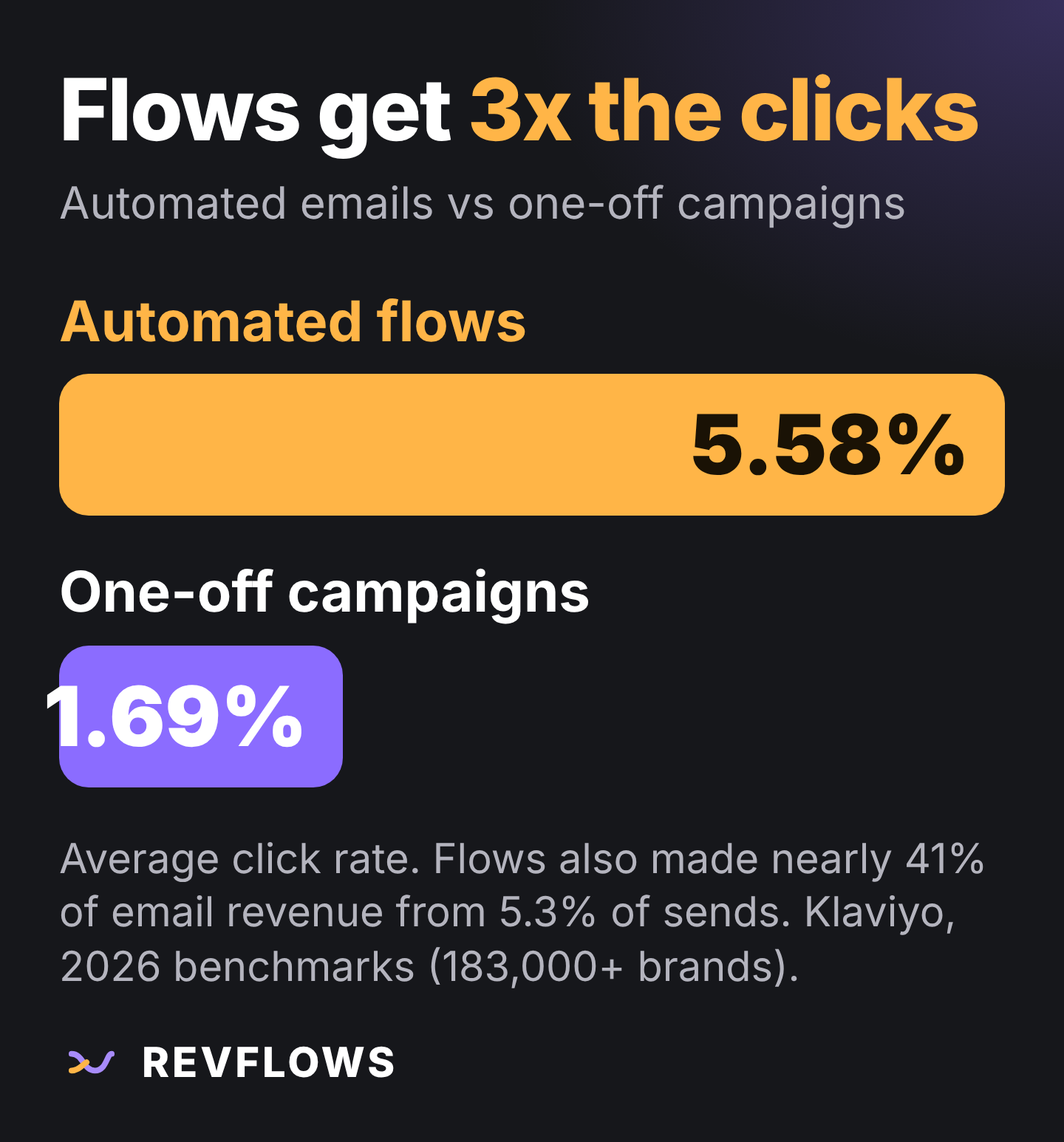
The same data shows flows get 5.58% click rates against 1.69% for campaigns. And nearly 48% of flow revenue came from new buyers, against 16% for campaigns. Automated emails are how first-time visitors become first-time customers.
The reason is simple: timing. An email that arrives the minute someone shows interest beats a newsletter that arrives on a random Tuesday.
How an automated email works
Every flow, in every tool, has the same five parts:
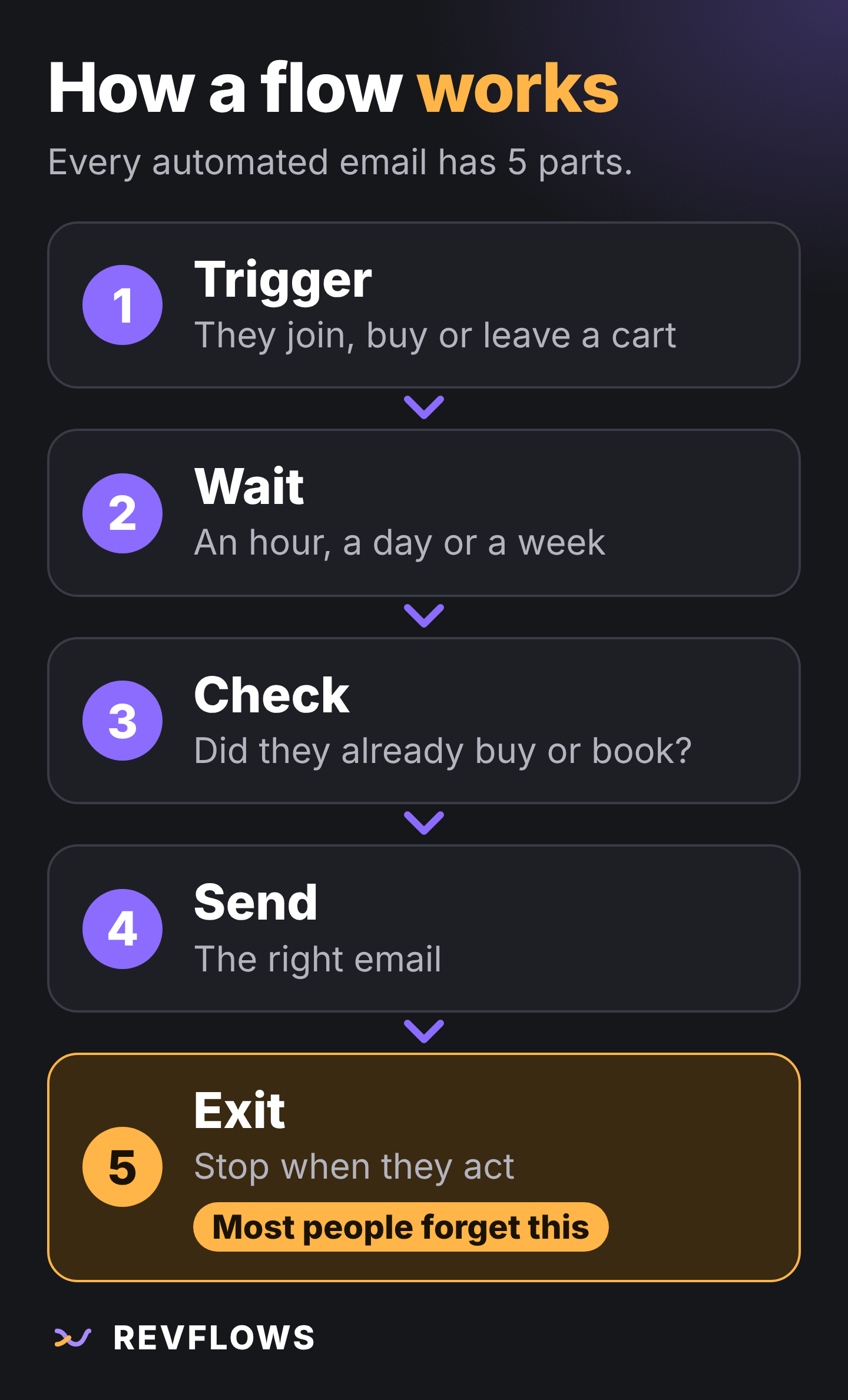
- Trigger. What starts it: joining the list, leaving a cart, a purchase, a visit, a date.
- Wait. How long before the email: minutes, hours or days.
- Check. A condition before sending: did they already buy? Are they a repeat customer?
- Send. The email itself, written for that moment.
- Exit. When to stop: they bought, booked or replied.
The check and the exit are what separate useful automation from spam. Nobody wants a “you left something behind” email an hour after they paid.
The 5 flows every small business needs
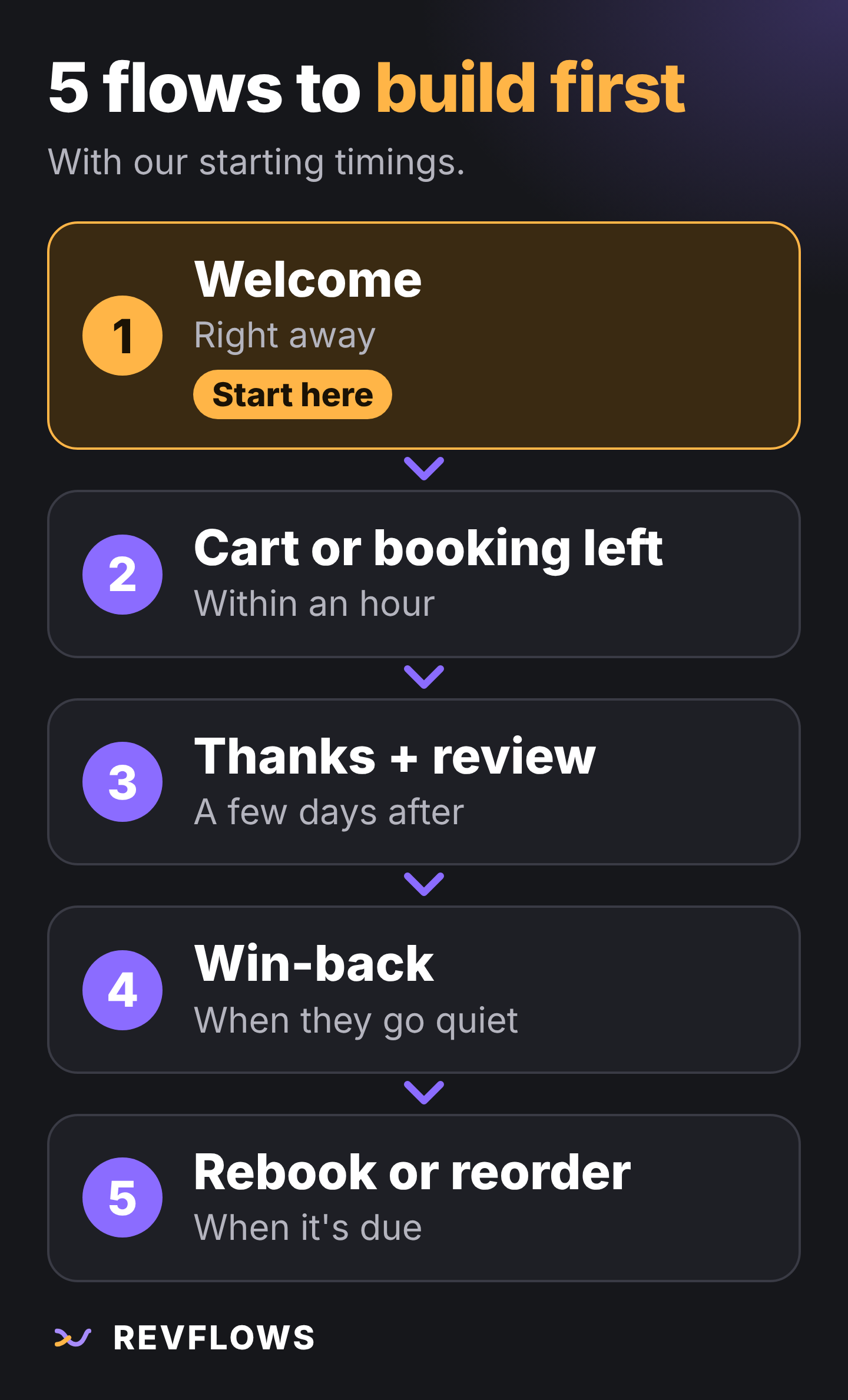
These five cover the moments that matter for most shops, clinics, hotels and online services. Build them in this order.
1. Welcome flow
Trigger: someone joins your list. Timing: the first email right away, then one or two more over the next week.
Deliver what you promised, say who you are in two lines, and give one next step: shop, book or reply. This is often the most-read email you’ll send. Ideas and templates are coming in our guide to welcome email examples.
2. Abandoned cart or booking flow
Trigger: someone starts a checkout, booking or quote and doesn’t finish. Timing: a first reminder within an hour, a second about a day later.
Baymard Institute’s average across 50 studies puts cart abandonment at 70.22%, roughly 7 in 10 carts. For a clinic or hotel, the same idea works for half-filled booking forms. Show what they left, answer the likely question (price, availability, delivery), and link straight back. Exact wording and timing are coming in our abandoned cart email guide.
3. Thank you and review flow
Trigger: a purchase, stay or visit. Timing: thanks the same day, a review request a few days later, once they’ve had time to use the product or feel the result.
Ask every customer the same way. Google’s review policy bans selectively asking only happy customers, and bans paying for reviews. More in our upcoming guide to review request emails.
4. Win-back flow
Trigger: no purchase or visit for longer than your normal buying cycle. Timing: depends on your business. A café might wait weeks; a furniture shop, a year.
Remind them why they came, share what’s new, and make returning easy. If they still don’t engage after a few emails, stop emailing them. Inactive contacts hurt your delivery to everyone else.
5. Rebook or reorder flow
Trigger: the date the customer is likely to need you again. Timing: shortly before it’s due.
A clinic’s check-up reminder, a salon’s “time for a trim”, a reorder email when supplies run low. This is the most underused flow, and often the easiest money, because the customer already trusts you.
Where AI helps
AI doesn’t change what a flow is. It makes each one faster to build and more personal:
- Writing. First drafts and variations of each email, in your voice, for you to edit.
- Product picks. Recommendations based on what each person viewed or bought. Klaviyo reports AI product recommendations lift click rates to 3.75% on average.
- Timing and segments. Sending when each person usually opens, and splitting flows for new vs repeat customers.
Keep a person reading every email before a flow goes live. A flow can send the same mistake thousands of times.
Which tool to use
Pick the tool that connects to the system that already knows your customers: your shop, booking software or CRM. Without that link, no trigger can fire.
- Online shops often use Klaviyo or their store’s built-in email.
- Service businesses often use Mailchimp, HubSpot or the email inside their booking or practice software.
All of them can run the five flows above. A head-to-head is coming in Klaviyo vs Mailchimp.
Make sure automated emails reach the inbox
Automated emails go out every day, so a delivery problem hurts them most. Gmail’s sender guidelines require every sender to set up SPF or DKIM, and anyone sending more than 5,000 messages a day to Gmail to set up SPF, DKIM and DMARC, keep spam complaints below 0.3% and offer one-click unsubscribe.
If those three acronyms mean nothing to you, read SPF, DKIM and DMARC explained. It’s a one-time job for whoever manages your domain.
How to set up email automation in 6 steps
1. Connect your email tool to your customer data. Link it to your shop, booking system or CRM, so it knows who joined, bought, booked or left something unfinished.
2. Authenticate your sending domain. Send from your own domain and add the SPF, DKIM and DMARC records your tool gives you.
3. Build the welcome flow first. Two or three emails, starting the moment someone joins.
4. Add the next four flows. Abandoned cart or booking, thank you and review, win-back, then rebook or reorder.
5. Set exit rules and frequency limits. Stop each flow when the person acts, and cap how many automated emails one person gets in a week.
6. Measure each flow monthly. Fix the weakest one first.
What to measure
- Revenue or bookings per recipient, for each flow. The number that tells you if it pays.
- Click rate. Klaviyo’s 2026 benchmark for a good flow click rate is 5.58%. Its customers are mostly online shops, so treat it as a guide.
- Unsubscribes and spam complaints. A jump means the timing or the message is off.
Skip open rates as a main measure. Apple’s Mail Privacy Protection hides whether people opened, so opens are no longer reliable.
Common mistakes
- No exit rule. Reminding people about a cart they already bought.
- Too many flows at once. Five good flows beat fifteen half-finished ones.
- Set and forget forever. Review each flow every few months. Prices, offers and links go stale.
- Writing like a robot. Automated doesn’t mean impersonal. Write each email as if to one person.
Our view
- Flows before campaigns. Build the five flows before you plan another newsletter.
- Timing beats wording. The right moment matters more than the perfect subject line.
- Delivery first. Authenticate your domain before you build anything.
Let your emails sell while you work
Want these five flows running without writing them yourself? We set up, write and run your automated emails in your voice, and report what each one earns.
Questions
What is email marketing automation?
Email marketing automation is sending emails automatically when a customer does something or reaches a point in time, like joining your list, leaving a cart, buying, or not buying for a while. You build each flow once, and the email tool sends the right message to each person at the right moment.
What are examples of automated emails?
The most common are a welcome series for new subscribers, an abandoned cart or unfinished booking reminder, a thank you and review request after a purchase or visit, a win-back email for customers who have gone quiet, and a reminder when it is time to rebook or reorder.
Is email marketing still effective in 2026?
Yes, especially automated email. In Klaviyo's 2026 benchmarks from more than 183,000 customers, automated flows made nearly 41% of email revenue from just 5.3% of sends, with click rates of 5.58% compared with 1.69% for one-off campaigns.
What is the difference between an email campaign and an automated flow?
A campaign is a one-off email you send to a list on a date you choose, like a newsletter. A flow is a series that sends on its own to each person when they trigger it, like joining or abandoning a cart. Flows are set up once and keep running.
What are the best email marketing automation tools for a small business?
Pick the tool that connects to the system that knows your customers. Online shops often use Klaviyo or their store's built-in email. Service businesses often use Mailchimp, HubSpot or the email inside their booking software. All of them can run the five core flows.