AI Employees · Email marketing · Automation · Guide
Email marketing for small business: the complete guide
 Eimantas KazėnasFounder, RevflowsUpdated Published
Email marketing for a small business means sending useful emails to people who asked to hear from you, so they buy, book or come back. Start with a list you own and 3 automated emails (welcome, follow-up, win-back), set up SPF, DKIM and DMARC so you reach the inbox, and judge it by revenue per email, not opens.
Key takeaways
- Email is the one channel you own. No algorithm decides who sees it.
- Start with 3 automated emails: welcome, follow-up and win-back. Add campaigns after.
- In Klaviyo's 2026 data, automated flows made nearly 41% of email revenue from just 5.3% of sends.
- Set up SPF, DKIM and DMARC, or Gmail may not deliver you at all.
- Judge email by revenue per email and clicks. Opens are no longer reliable.
Most small businesses already have an email list. It’s in the booking system, the shop, the CRM or a spreadsheet. Few use it well.
Email marketing for a small business means sending useful emails to people who asked to hear from you, so they buy, book or come back. Done right, most of it runs on its own.
Klaviyo, which studied more than 183,000 of its customers’ email programs, put the finding bluntly:
“Flows generate nearly 41% of total email revenue from just 5.3% of sends ... proving automation is the primary revenue engine in email.”
This guide covers the whole job: what to send, how to build the list, how to reach the inbox, what to measure and where AI fits. Each section links to a deeper guide.
What is email marketing?
Email marketing is sending emails to people who agreed to hear from your business. The goal is a sale, a booking, a review or a repeat visit.
There are two kinds of email:
| Type | What starts it | Examples |
|---|---|---|
| Automated emails (flows) | Something the customer does | Welcome, abandoned cart, booking reminder, review request, win-back |
| Campaigns | You decide to send | Monthly newsletter, seasonal offer, new service launch |
Automated emails are the engine. You write them once and they send for years, each at the moment it matters most. Campaigns keep you in mind between those moments.
Why email still pays for a small business
Three reasons email beats most channels for an owner-led business.
You own it. A social post reaches whoever the platform chooses. An ad stops the day you stop paying. Your email list stays yours, and every send costs almost nothing extra.
It reaches people who already know you. Your list is past customers, patients, guests and leads. They are far easier to sell to than strangers.
The return is high. In Litmus’s State of Email 2025 data, 35% of marketing leaders said they get $10 to $36 back for every $1 spent on email, and another 30% said $36 to $50.
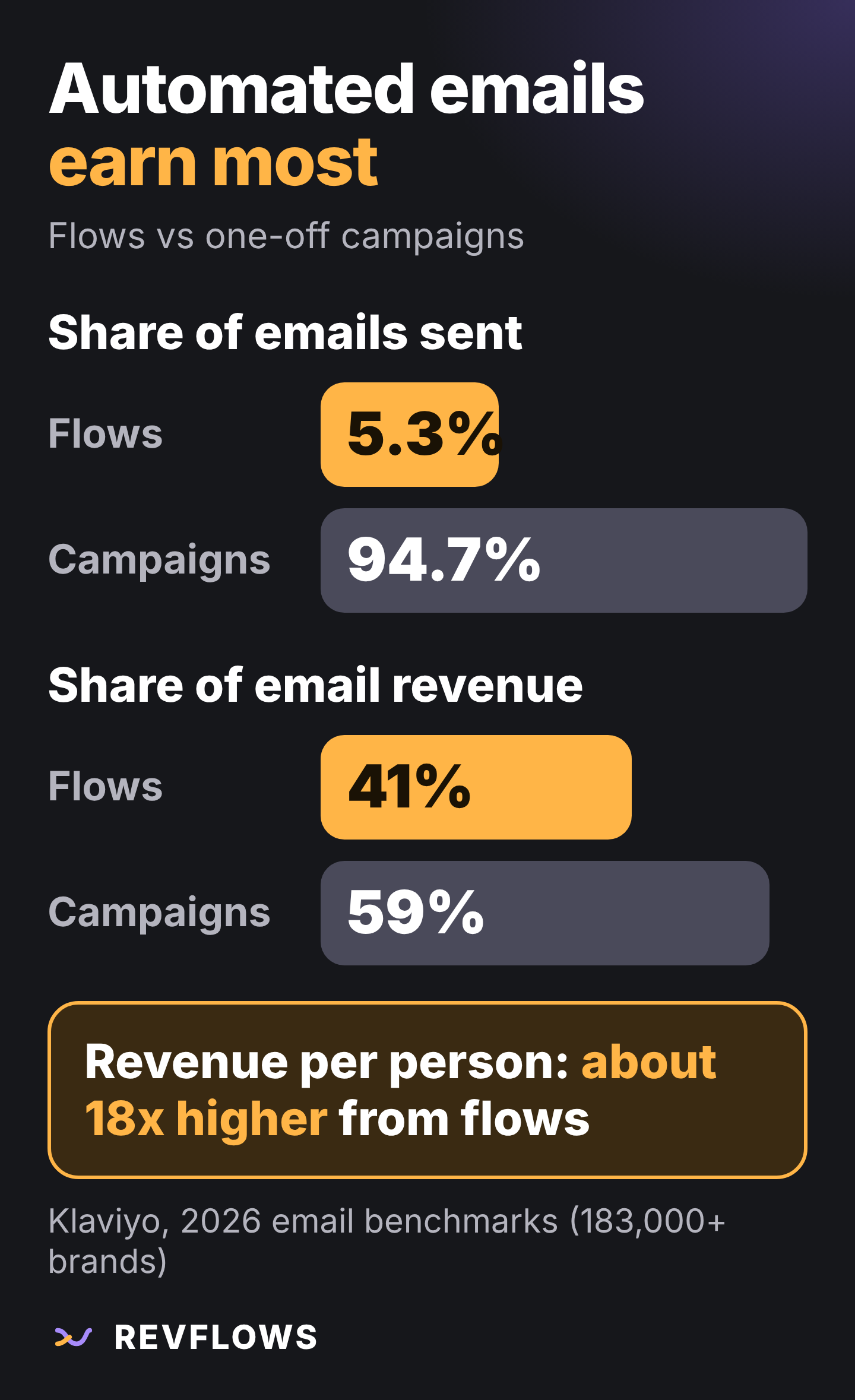
Klaviyo’s numbers also show who those automated emails reach. Nearly 48% of flow revenue came from new buyers, against 16% for campaigns. Welcome and abandoned-cart emails turn first-time visitors into first-time customers.
What you need before you send
Four things. None of them takes long.
- A list of people who opted in. Never buy a list. Bought lists get you marked as spam, and emailing people who never agreed can break anti-spam laws.
- An email tool. Pick one that connects to your shop, booking system or CRM, so it knows who bought, booked or went quiet.
- Your own sending domain, authenticated. Send from [email protected], not a free Gmail address. More on this in the inbox section.
- A reason to join. “Subscribe to our newsletter” is not a reason. “Get our implant price guide” is.
How to build your email list
The best list is built from people who already deal with you. Add a signup step everywhere they already are:
- Booking and checkout. Add an opt-in box (unticked) when people book or buy.
- Your website. One simple form on key pages, with a clear offer.
- In person. A QR code at the front desk, on receipts or in the room.
- Inquiries. When someone asks a question by email or chat, ask if they want follow-ups.
Good offers by industry:
| Business | Offer that earns a signup |
|---|---|
| Clinic | Treatment price guide, aftercare checklist, first consultation offer |
| Hotel | Direct-booking rate, local guide, early access to seasonal deals |
| SaaS | Setup checklist, templates, product update digest |
| Digital products | Free chapter or lesson, discount on the first purchase |
A full walkthrough is coming in our guide to building an email list from zero.
The 5 automated emails to set up first
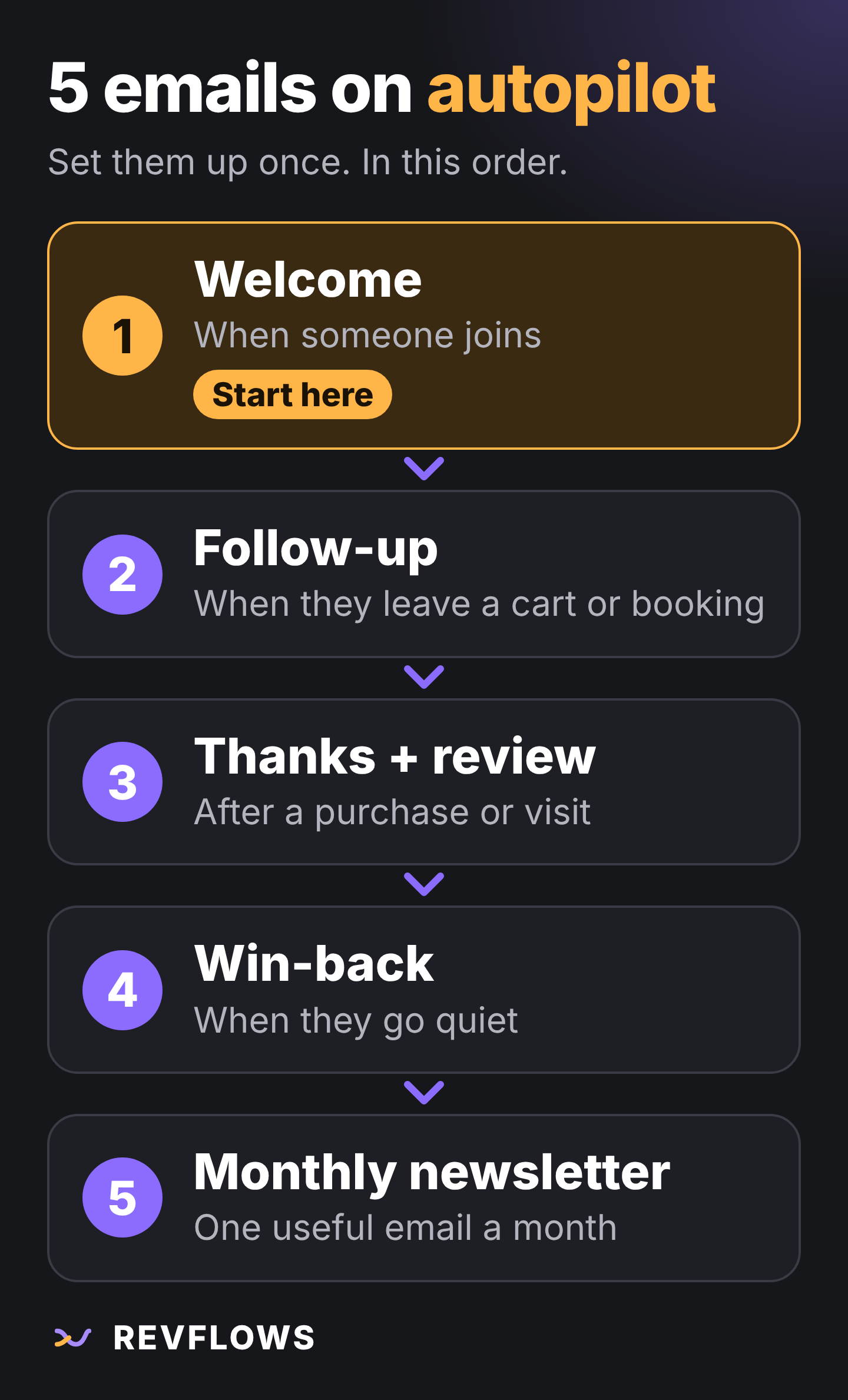
These five do most of the work for most small businesses. Set them up in this order.
1. Welcome email
Sends the moment someone joins. Deliver what you promised, say who you are in two lines, and give one next step: book, shop or reply.
This is often the most-read email you will ever send. Write it first. Examples are coming in our guide to welcome emails that get a first sale.
2. Follow-up for unfinished actions
Someone started but did not finish: a cart, a booking form, a quote request. Baymard Institute’s average across 50 studies puts online cart abandonment at 70.22%. That’s roughly 7 in 10 carts left behind.
A short reminder within a few hours brings some of them back. For a clinic or hotel, the same idea works for unfinished booking forms. Timing and wording are covered in our abandoned cart email guide.
3. Thank you and review request
Sends after a purchase, stay or visit. Thank them, check everything was fine, and ask for a review. Happy customers rarely think to leave one unless asked.
Ask every customer the same way, and never offer a discount for a review. Google’s review policy bans businesses from selectively asking for positive reviews and from paying for them.
4. Win-back
Sends when a customer has not bought or booked for longer than usual. For a dental clinic that might be 7 months after the last cleaning. For a shop, twice the normal gap between orders.
Remind them what they liked, give them a reason to return, and make it easy to say no. A clean list is worth more than a big one.
5. Monthly newsletter
Your one regular campaign. One useful idea, one piece of news, one offer. Same day each month. Short enough to read on a phone.
How to start: 7 steps for your first week
1. Pick one email tool. Choose one that connects to your shop, booking system or CRM. Klaviyo, Mailchimp and HubSpot are common. A comparison is coming in Klaviyo vs Mailchimp.
2. Authenticate your domain. Ask whoever runs your domain to add SPF, DKIM and DMARC records. Your email tool shows the exact values.
3. Add a signup form with a reason to join. One form, one offer, on the pages people already visit.
4. Set up the welcome email. It sends the moment someone joins.
5. Add two more automated emails. A follow-up for unfinished carts, bookings or quotes, and a win-back for quiet customers.
6. Send one useful email a month. Pick a day and keep it.
7. Measure revenue, clicks and complaints. Once a month, fix the weakest email first.
How often should you send?
Automated emails need no schedule. They send when the customer acts.
For campaigns, start with once a month. Move to twice a month only if two things hold: people keep clicking, and unsubscribes and spam complaints stay low. Sending more to people who never open hurts your delivery to everyone else.
How to reach the inbox, not the spam folder
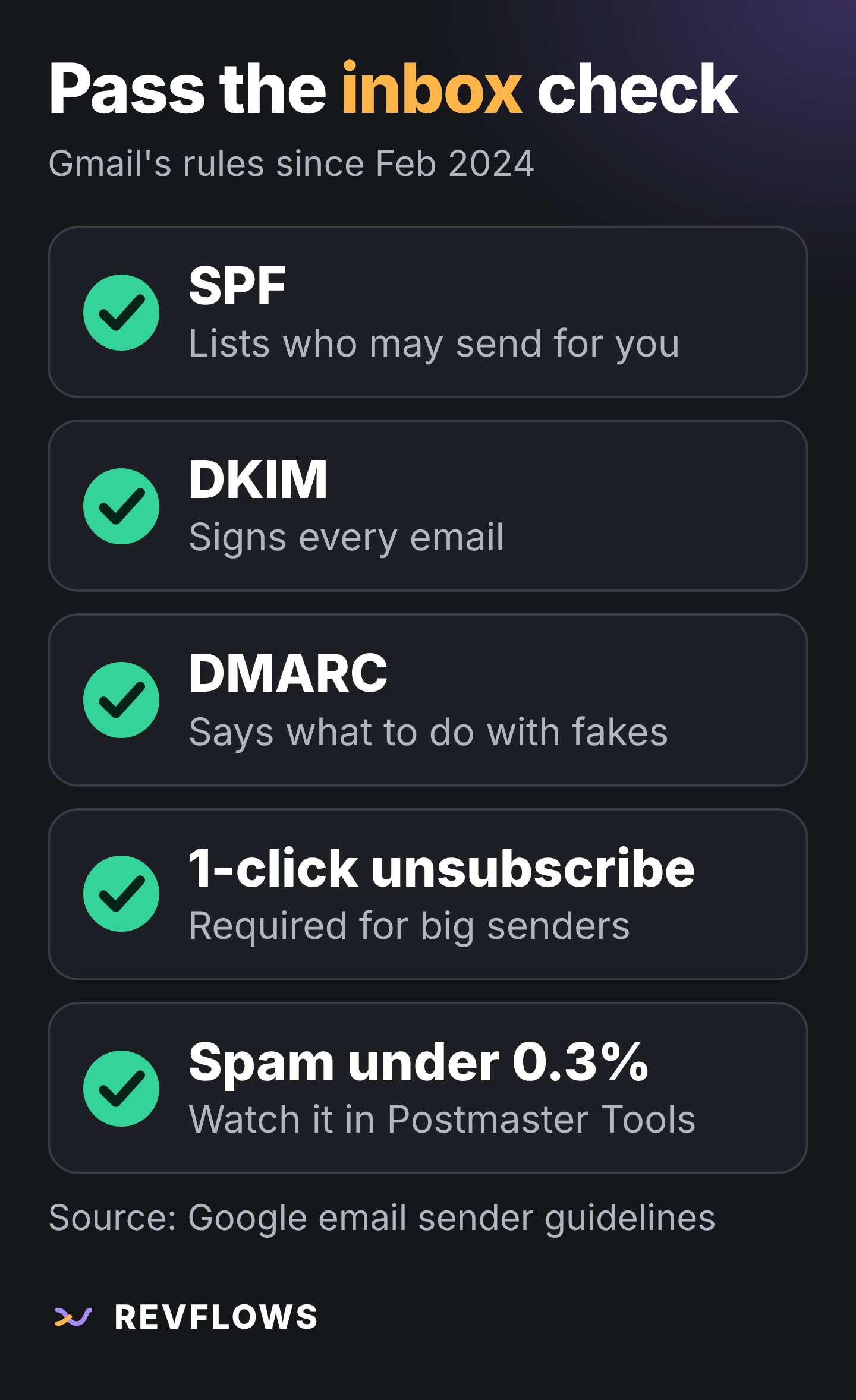
Since February 2024, Gmail requires every sender to authenticate their email. Big senders face stricter rules. From Google’s email sender guidelines:
| Rule | All senders | More than 5,000 a day to Gmail |
|---|---|---|
| SPF or DKIM authentication | Required | SPF and DKIM required |
| DMARC | Recommended | Required (policy can be “none”) |
| Spam rate in Postmaster Tools | Below 0.3% | Below 0.3% |
| Easy unsubscribe | Expected (Google: “always” give one) | One-click unsubscribe required for marketing email |
In plain words:
- SPF lists which servers may send email for your domain.
- DKIM adds a digital signature that proves the email was not changed on the way.
- DMARC tells inboxes what to do when an email fails those checks, and sends you reports.
Most email tools walk you through the records. It’s a one-time job for whoever manages your domain. A plain explainer is coming in SPF, DKIM and DMARC explained.
Beyond the records: only email people who opted in, make unsubscribing easy, and stop emailing people who have not opened or clicked in months.
What to measure (and why opens mislead)
Open rates used to be the main number. Not anymore. Apple’s Mail Privacy Protection, as Apple describes it, “prevents senders from seeing if you’ve opened the email message they sent you.” Many opens you see are now guesses.
Track these instead:
| Metric | What it tells you | Where to look |
|---|---|---|
| Revenue or bookings per email | Is email paying? | Your email tool, shop or booking system |
| Click rate | Did the email make people act? | Your email tool |
| Unsubscribe rate | Are you sending too much, or the wrong thing? | Your email tool |
| Spam complaints | Are you at risk of the spam folder? | Google Postmaster Tools |
| List growth | Is the list growing faster than it shrinks? | Your email tool |
For a rough benchmark, Klaviyo’s 2026 data puts a good click rate at 1.69% for campaigns and 5.58% for automated flows. Its customers are mostly online shops, so treat these as a guide, not a target for a clinic or hotel.
Choosing an email tool
Do not start with features. Start with three questions:
- Does it connect to the system that knows your customers? Shop, booking software, CRM. Without that, no automated email can fire.
- Can I build the 5 emails above without a developer?
- What will it cost when my list is 3 times bigger? Most tools charge by number of contacts.
Online shops often pick Klaviyo or Shopify’s own email. Service businesses often use Mailchimp, HubSpot or the email built into their booking or practice software. We compare the two most common options in Klaviyo vs Mailchimp.
What does email marketing cost?
Three costs:
- The tool. Usually a monthly fee that grows with your number of contacts.
- Time. Setup takes days. After that, a monthly newsletter and a quarterly review of your automated emails.
- Help, if you want it. A freelancer, an agency, or a managed service that runs it for you.
Real price ranges are coming in our guide to what email marketing costs.
Where AI fits in email marketing
AI is now good at the parts of email that used to eat the most time:
- Writing. Drafting each email in your voice, and versions for different customers.
- Timing. Sending when each person is most likely to read.
- Personalizing. Picking the product, treatment or offer that fits each person.
- Replying. Answering questions that come back to your inbox, within minutes.
Klaviyo’s data shows the effect: emails with AI product recommendations averaged a 3.75% click rate. Keep a human check on prices, medical or legal claims and anything you would not want sent twice.
This is what our AI email marketing service does: the five emails above, written in your voice, sent at the right moment, and reported in revenue. For the wider picture of what AI can take off your plate, see what AI automation is.
Email marketing for clinics, hotels, SaaS and digital products
| Business | First 3 automated emails | One number to watch |
|---|---|---|
| Clinic | Booking confirmation and prep, aftercare plus review request, recall at the next due date | Rebooked patients from email |
| Hotel | Pre-arrival tips and upgrades, post-stay review request, direct-booking offer before the same season next year | Direct bookings from email |
| SaaS | Onboarding series, inactive-user nudge, trial-ending reminder | Trial to paid from email |
| Digital products | Welcome with a free lesson, abandoned checkout, next-product offer after the first purchase | Revenue per subscriber |
Common mistakes
- Only sending newsletters. Campaigns alone leave most of the revenue on the table.
- Sending from a free email address. Gmail and others treat it as a red flag.
- Never cleaning the list. Old, silent addresses drag down delivery for everyone.
- Judging by opens. Look at clicks and revenue.
- One email for everyone. A first-time visitor and a five-year customer need different words.
Our view
- Automate first, campaign second. Three good automated emails beat a year of newsletters.
- Delivery is the foundation. The best email in the world earns nothing in the spam folder. Set up SPF, DKIM and DMARC before anything else.
- Measure money, not opens. If you can’t see revenue or bookings per email, fix that before you write another one.
Turn your list into revenue
Want this running without writing a single email? We set up and run the five emails above in your voice, and report what each one earns.
Questions
What is email marketing?
Email marketing is sending emails to people who agreed to hear from your business, to help them buy, book or come back. It includes automated emails that send when someone does something, such as joining your list or leaving a cart, and regular campaigns such as a monthly newsletter.
Is email marketing worth it for a small business?
Usually, yes. You own your list, so you do not pay for every message the way you pay for ads. In Litmus's State of Email 2025 data, 35% of marketing leaders said they get $10 to $36 back for every $1 spent on email, and 30% said $36 to $50.
How often should a small business send marketing emails?
Automated emails send when a customer does something, so they need no schedule. For campaigns, start with one useful email a month and move to two or more only if clicks hold up and unsubscribes and complaints stay low.
What do I need to set up before sending marketing emails?
A list of people who opted in, an email tool, and your own sending domain set up with SPF, DKIM and DMARC. Gmail requires authentication from all senders, and senders of more than 5,000 messages a day to Gmail must also have DMARC and one-click unsubscribe.
Can AI write my marketing emails?
Yes, with guardrails. AI can draft emails in your voice, pick send times and personalize content for each person. Keep a human check on facts, prices and offers, and judge the results by revenue and replies, not by how many emails were sent.